
Review comments and send replies
Filter unanswered social comments, write or generate drafts, review them, and send replies safely.
Open this featureBefore you start
Your workspace plan must include AI comments.
The social account must be connected to Mirr with a valid token.
Comment review and replies currently cover Threads, Instagram, Facebook, and YouTube. X requires write permission, while LinkedIn replies are limited.
AI reply generation uses AI credits. Treat every result as a draft and review tone, facts, personal data, and sensitive language before sending.
Open Comment management
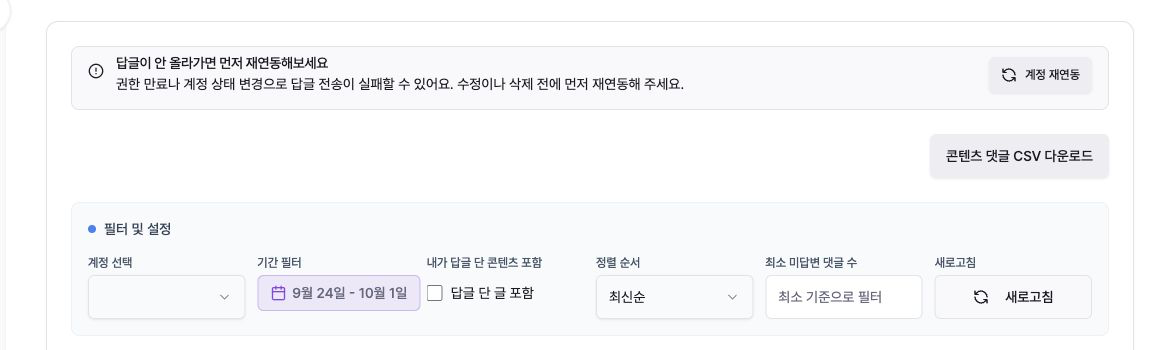
Choose the Korean menu “고객 모으기 → 댓글관리” (Collect customers → Comment management). If “답글이 안 올라가면 먼저 재연동해보세요” appears, use “계정 재연동” (Reconnect account) first.
“콘텐츠 댓글 CSV 다운로드” downloads comments for the current account and date filters.
Narrow the comments
Use “계정 선택” (Account) and “기간 필터” (Date range) to choose the source and period.
Enable “내가 답글 단 콘텐츠 포함” to include posts you already replied to.
Sort by newest, oldest, or unanswered count, and set a minimum unanswered-comment count.
Select “새로고침” after changes. If the list is empty, choose all accounts and widen the date and minimum-count filters.
Select posts and comments
Posts are grouped by account, post text, date, and unanswered count. Expand a post to see the author, time, comment, and reply field.
Use the per-post “모두 선택,” comment checkboxes, or the page-level “모두 선택” to define the generation scope.
With no comment selected, per-post AI generation targets every displayed comment in that post.
Separate abusive, personal-data, billing, legal, or medical comments for manual review.
Write a reply manually
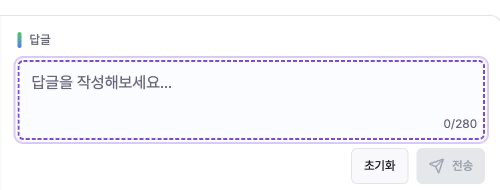
Write up to 280 characters in the Korean “답글” field. “전송” stays disabled if the limit is exceeded.
Drafts are kept in the browser. “초기화” clears the field; “전송” posts that single reply.
Recheck the account and original comment before sending, then verify important replies on the source platform after the success notice.
Generate AI reply drafts
In “이 콘텐츠의 일괄 댓글 지침,” specify formality, thanks, required information, prohibited wording, and CTA rules.
“댓글 생성” fills drafts for selected comments, or all displayed comments if none are selected. It uses AI credits but does not send replies.
Review relevance, brand voice, facts, promises, personal data, and repeated wording.
Edit each draft, then send individually or use “모든 댓글 전송” only after every draft is approved.

Process multiple posts
Selecting multiple posts opens batch instructions. Add common guidance and choose “AI 답변 생성.”
Generation runs post by post, targeting selected comments or all displayed comments when none are selected.
“모든 댓글 전송” queues only comments with drafts. A start notice confirms acceptance, so verify final posting on each platform.
When no replies are needed
Switch to all accounts, widen the date range, lower the minimum unanswered count, and refresh.
Enable “내가 답글 단 콘텐츠 포함” to audit comments already answered.
Connect or reconnect an account if access is missing or expired.
Your own comments are excluded from unanswered results. Refresh if a platform reply still appears as unanswered.
Troubleshooting
If sending fails, reconnect the account first; an invalid token cannot post replies.
If accounts or posts are missing, confirm the platform, widen account and date filters, and refresh.
X sending requires write permission, and LinkedIn replies are currently limited.
If Generate is disabled, enter instructions and check the selection; if Send all is disabled, create drafts first.
If individual Send is disabled, add text or shorten it to 280 characters.
For AI failure, check AI credits and make the instruction clearer.
Successfully handled replies leave the unanswered list; confirm the actual reply on the source platform.