
AI Content Planning Guide
Choose source material, set a direction, generate drafts, and continue into carousel, video, or text production
Open this featureBefore you start
Open ‘콘텐츠 기획’ (Content Planning) under Content Creation, then choose the account that should guide the plan from the selector at the top. That account’s AI style is used for idea suggestions and draft writing.
Select ‘콘텐츠 스타일이 마음에 안드시나요?’ (Not happy with the content style?) and check the account’s language, concept, and target audience first. You cannot request ideas until the account’s AI style setup is complete.
If your plan uses credits, check the cost shown on each action button. Costs can vary by plan, so the value currently shown in Mirr takes precedence over examples in this guide.
1. Choose where ideas should come from
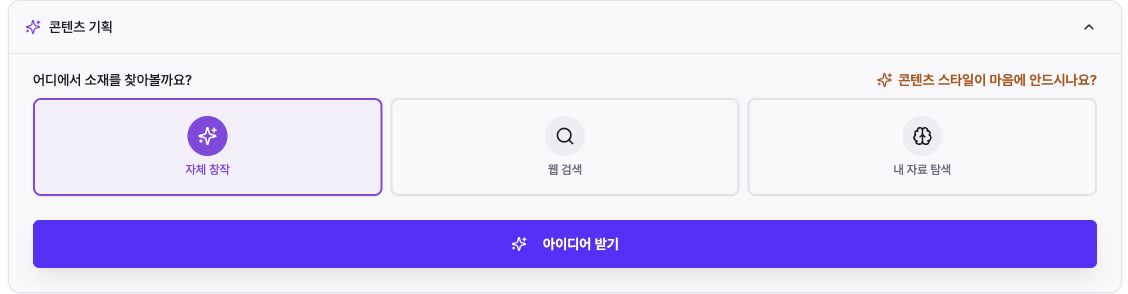
Expand ‘콘텐츠 기획’ (Content Planning). Under ‘어디에서 소재를 찾아볼까요?’ (Where should we look for material?), you will see ‘자체 창작’ (Original creation), ‘웹 검색’ (Web search), and ‘내 자료 탐색’ (Search my files).
Original creation turns experiences and opinions into ideas without outside material. Web search researches current external sources; when a card shows ‘외부 소스’ (External sources), open and verify them before producing a draft.
Search my files finds material in documents uploaded for the account. Upload your files, select the documents to use, and then choose ‘아이디어 받기’ (Get ideas).
2. Give the ideas a direction
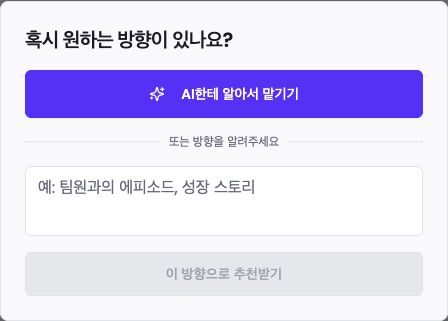
After you choose ‘아이디어 받기’ (Get ideas) for Original creation or Web search, the ‘혹시 원하는 방향이 있나요?’ (Do you have a direction in mind?) dialog opens. If you have no fixed topic, select ‘AI한테 알아서 맡기기’ (Let AI decide).
For a specific campaign or customer problem, write the audience, problem, and desired angle in one sentence, then select ‘이 방향으로 추천받기’ (Recommend using this direction). This action starts idea generation.
If Mirr says the queue is full, wait for a running generation task to finish and try again.
3. Read the planning board
‘작성 대기중’ means Waiting to be written: the idea has a title and description but no body draft. ‘초안 생성됨’ means Draft generated. ‘초안 사용됨’ means Draft used in a production or post workflow.
The number on each column is the number of ideas currently loaded there. On mobile, swipe the board horizontally to move between columns.

4. Turn an idea into a draft and review it
Read the title and description in ‘작성 대기중’ (Waiting to be written), choose an idea, and select ‘초안 생성’ (Generate draft). The current credit cost is shown on the button.
When generation finishes, the card moves to ‘초안 생성됨’ (Draft generated). Open it to review and edit the body; for web-researched ideas, verify the external sources too.
Deleting an idea also removes related content and cannot be undone, so check the confirmation dialog carefully.
5. Continue into production
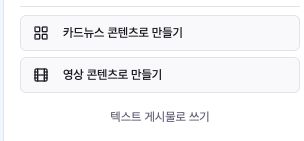
On a reviewed draft, choose ‘카드뉴스 콘텐츠로 만들기’ (Make carousel content), ‘영상 콘텐츠로 만들기’ (Make video content), or ‘텍스트 게시물로 쓰기’ (Write as a text post).
Generating a draft in Content Planning does not publish it to a social network. Review and edit the result in the selected production flow; publishing or scheduling happens later as a separate action.
Troubleshooting
If ‘아이디어 받기’ (Get ideas) is disabled, check the selected account and its AI style setup. For Search my files, select at least one document. If the queue is full, wait for a running task to finish.
If ideas do not fit your brand, refine the account’s AI style and state the audience and angle in the direction dialog. Use Web search for current facts and Search my files when the result must stay faithful to company material.
For web-researched ideas, open ‘외부 소스’ (External sources) and verify dates, figures, and original context. Do not treat an AI-written summary as confirmed fact.
If draft generation does not start, check the displayed cost and remaining credits. Scroll down within each column to load older ideas; on mobile, also confirm that you are viewing the correct status column.